Showing posts with label CliMate. Show all posts

Thursday, September 1, 2016

cliMate 3.8 Animated Weather Widget Released!

Last night version 3.8 of cliMate Animated Weather Widget was released.

This has the long awaited new Pirate Theme, with all the usual weather conditions looking out the porthole of a pirate ships cabin onto pitching and rolling seas. Featuring:

Moving sea
Pirate ships
Seagulls
Swinging lantern with a candle that flickers in night and sunset scenes
Moving steering chain


Like the Town House theme, this consists of many layers of complex animation, so is a lot slower to start the main screen than the other themes, but the widget itself is just as fast and smooth as always.
 
So what is next?
 
1. First I want to redo the YouTube demo video for the widget, as it is woefully out of date, and doesn't show any of the new features or themes.
 
2. There is a new Android PercentageLayout technology available that should let me speed up the main screen considerably, so I will have a look at that next.
  
3. I want to will take another look at the idea of a 6 hour morning, afternoon, evening and night forecast for a particular day.
 
4. Then after that start on some new themes maybe, not sure yet which I will turn my attention to, but perhaps something that is a bit less complex than the last few, as they take so long to do. Something which is a variation of the existing Countryside theme would be a lot quicker to do, maybe with a cottage or castle in the foreground.
 
Other ideas for themes I have had:
 
  • Harry Potter style castle with flying broomsticks
  • Sherlock Holmes' study
  • Airplane porthole
  • Beach Cave
  • Isle of Skye 

Friday, July 15, 2016

New Version 3.7.2 of CliMate Animated Weather Widget released

The new version 3.7.2 was released today.

This fixes the Current Location issue on some devices, by allowing Google Play Services to be used to get the location. There is a new Use Google Play Services checkbox in the Set Location settings screen.

This will be automatically ticked for Android 6.0+ devices, but you can change that at any time. If its not ticked, it uses the old method of getting the location, which is fine for the vast majority of devices.  Just tick the box if you are having trouble getting the location.


Now I will go back to the Pirate Theme, and see if I can speed that up.

Thursday, July 7, 2016

Current Location problems..

Had several reports that CliMate Animated Weather Widget's current location setting is no longer working on Android 6.0 devices.

This is really strange, as it works on some devices, but not all. It works perfectly on my friend's S7 Edge, for example, but not on S7's for several customers who contacted me.

It looks like the current CliMate method of getting the location using Android's LocationManager is just no longer reliable on the latest devices running 6.0, even though it should be.

So the newer recommended method using Google Play Services is the way to go. A few users having problems have helped me out by running some tester apps that successfully get the location using Google Play Services.

At the same time I am moving the development environment from Eclipse to Android Studio, so I can take advantage of the easier way of integrating such newer services. This is not trivial, and has given me a lot of headaches but is the way forward.

The new theme such as Townhouse and the forthcoming Pirate theme are pretty slow to start up, because they are using so many layers of views to display the various animations. Using Android Studio, I can start to use some new features such as PercentageLayouts, which will drastically reduce the number of layers I need to show such complex animations.

So the next steps:

  • Convert CliMate to run under Android Studio
  • Add the new Google Play Services to get the current location
  • Test and the publish the update so customers having issues get the fix
Then:

  • Use PercentageLayout on the partially completed Pirate Theme
  • Finish the Pirate Theme
  • Publish an update
  • Change the Townhouse and other themes to use PercentageLayout.


Tuesday, May 31, 2016

More pirates...

Work continues on the Pirate Theme... here is the scene for the Partly Cloudy Sunset weather condition:

 
So what's new? First off the foreground is finished, and tweaked so that the forecast animations are clearly visible in front of the table and its contents.
 
Then there is a brand new lantern style on the top left, and at night and sunset times it has a flickering candle, which in turns cast a flickering light on the left corner of the cabin. And of course the lantern still swings as the ship pitches and rolls.
 
In the sea, the pirate ship in the distance now has a smoothly animated wake, matching the white tops colour of the current sea.
 
I can't do a great deal more with the animations, there is already so much going on and so many layers required to create these special effects that its pushing even my trusty Samsung S5.
 
I may consider an island in the distance, but that was pretty hard to get looking nice at first so I temporarily abandoned it.
 
Anyway, still enjoying this, and probably the best looking and most dramatic widget theme yet.


Thursday, April 21, 2016

Pirate Foreground almost complete

Pretty happy with the new theme foreground now.

  • Redid the sword, pistol and map
  • Made the brass porthole smaller so it fits better into the standard 4x2 widget size.
  • Added a sextant and a nice rope on a cleat.
  • Added a smoothly animating steering chain at the top, that slides in and out. This simulates the control of the ships steering wheel, that used to be attached via chains or rope to the actual steering board at the back of the ship.
Here is the current widget in Weather Only mode:


And in the main screen:


Now all that remains on the foreground is to improve the swinging lantern on the left, I want something with a bit more realism for the 18th Century period, the current one looks too much like a miner's lamp.

Then I will quickly do a night/sunset variation, to see if it looks good. maybe will give the lantern a flickering candle if possible.

Then on to the sea, coast and ships visible through the porthole! 

Wednesday, March 30, 2016

New version 3.7 released!

So the new version 3.7 of cliMate Animated Weather Widget was released on Monday 29th.

What's new?

First fixed a problem with the fonts on the forecast part of the widget, this only occurred when using Next 3D Launcher, due to a bug in that launcher. I finally developed a work around, and the fonts are perfect now.
 
Then there were a few issues when using the Weather Only setting, the idea here being that no text at all is shown. There were two problems, the Refreshing icon was still showing, and the there was a grey background in the forecast area showing for some weather conditions, as it was expecting to use that to make the forecast details show up better. As there is no need for either of those during Weather Only, they are now hidden.
 
The Font on the wind speed units was not scaling correctly to the screen size, that is now fixed.

Then I improved the 
Rain Shower and and Snow Shower forecast thumbnails, made the falling rain and snow bigger and easier to see, and the sun and clouds more clear.

And finally, there is a brand new Town House theme. This is actually based on the view from my parent's house in England. It features the usual weather conditions, birds and plane in the background, but in the foreground we have an Audi driving up the driveway, cars driving past on the High Street in the distance, and the flag of your current country waving from the top of the tower behind the trees. The cars have headlights at night. Finally, there is a little solar powered flower toy that moves its leaves based on the amount of sunlight available.

This theme was a labour of love and originally just going to be for my parents and nieces, but I decided to share it with everyone as its a lot of fun!


So now started work on something completely different, a pirate theme!
 
This simulates the view from a porthole on a pirate ship. The whole view outside the window moves and rotates as if the ship is moving in the sea, looks super realistic. There will be islands and ships moving past, seagulls, maybe dolphins or sharks or a whale, and inside the cabin will be lots of piratical stuff, like chests of gold, treasure maps and cutlasses. The below is a sneak peak of a proof of concept to see how the movement worked. Will start in earnest on that next week.

Wednesday, December 2, 2015

cliMate v3.6 Released!

I am pleased to report that version 3.6 of climate Animated Weather Widget has been released.

What does this new version have, you ask?

  • Added Night and Sunrise/Sunset scenes to Chinese Art Theme
  • Clock can now be moved and resized
  • Improved Clock resolution and readability
  • Added Portuguese Translation
  • Improved Russian and Hungarian Translation
  • Bug fixes for clock refresh
  • Simplified settings layout
Here are a few examples of the Chinese Art sunset and night scenes:


Then for the clock resizing, this is now accessed via the new Clock settings screen available from the main Settings:


The Size and Position setting now lets you drag the clock to any of 9 positions, and drag the slider to change the clock size, all the while seeing a preview of how it will look on your widget:


This works of course for all the clock styles, including analogue, and gives you a lot more freedom to customize your widget. I currently like the look of a smaller clock on the bottom right:


In order to support clock resizing, I have had to improve the resolution and sharpness of the clock, and that have also given me the freedom to change clock fonts in the future, look for that in the next version.

So what's next? I want to have a morning/day/evening/night forecast for the current day, something like the look below. You would then be able to swipe between this and the usual 5 day forecast. This is work in progress, but I know now exactly how to get that daily forecast information.


Then of course, new themes. Still playing around with various ideas, but I do like the idea of a Jungle theme, even though it will be hard to justify a snow scene!


Other ideas include window style frames that could be added to various themes, and perhaps a coastal lighthouse. Keep your ideas for themes coming in!


Thursday, October 29, 2015

cliMate version 3.5 Released!

Finally the new version 3.5 of cliMate Animated Weather Widget is released!

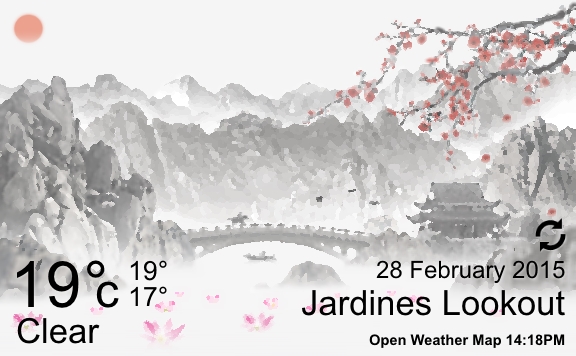
It contains the long awaited Chinese Art theme:

 
This theme has an oil painting feel, so everything is a little smudged and blurry, as if an oil painting has come to life. It features a lake with drifting water lilies, mountains and a water fall, a bridge with a horse and rider running across to a temple, and a fishing boat. Cherry tree branches sway in the wind, and flower blossoms drift slowly down.
 
Mostly black and white with a few splashes of colour. Hope you all like it!
 
This version also features a new Transparent Theme, where your chosen wallpaper can be seen behind the widget.
 
Also the ability to hide all the widget text entirely, if you just want to see the weather pictures with no distractions.
 
Finally, added Hungarian and Russian languages.
 
Next up, as always working on new themes, but also want to add a Morning/ Afternoon/ Evening/ Night forecast on the main screen, which would look something like this:
 
 
You would then swipe between this and the usual 5 day forecast. :o) Let me know what you think.


Saturday, August 15, 2015

Chinese Oil Painting

A tweak to the last post, its clear that the style I have produced is more like an oil painting than a water colour, in fact the graphics effect I was using was named Oil Painting, not sure why I was thinking it was a water colour.

I was then able to apply the same effects to the animated forecast thumbnails; see below for a full screen version of the theme.

 
Now going to experiment with tweaking the red sun a bit to make it look more like a painting, and then will start on the other weather conditions.

Thursday, August 6, 2015

Yet More Chinese Theme

I really wasn't happy with the overall look of my new Chinese Theme.

The layout and ideas were fine, it just didn't look right, too faded out. I know was trying to emulate a sketch or pencil drawing, but it just doesn't have the impact of the other themes, it didn't look pencilly enough, and it was not easy to see at a glance what the weather condition is, which is after all the whole point.

So I was playing with ways of increasing the contrast, making it darker and more easy to see, and came across a nice visual effect to make it look more like a water-colour painting.

As it happens I visited the studio of a water-colour artist during my recent holiday in England, and it inspired me a little. Thus the theme now looks a lot more like a moving painting, more arty and abstract, and less worry about photo realism.


I think this is an improvement on the screenshot in the last post, much easier to see what is going on, and if nothing else gives me an obvious title for the theme: Chinese Watercolour

Thursday, July 16, 2015

More Chinese Mountains and themes..

Coming towards the end of the design for the Chinese theme now.

Improved flowers on the lake, both static and moving, and fixed the mountains in the background.

Here it is with the weather text overlay:


Click for a larger version. I will be able to start work on the weather conditions soon.

Then a quick preview of the African Savannah idea, just the backgrounds at the moment, but I like the contrast of the yellow and blues, as opposed to the greens of the normal countryside:


Watching the new Zoo tv series is what gave me this inspiration, and another scene set in Tokyo makes me really want to a proper Japanese painting theme, similar to the Chinese but more abstract.  


Tuesday, July 14, 2015

More Chinese Theme..

Been doing more work on the Chinese Painting theme showing a misty mountain lake, see below:


First off, blending the edges so they fade into white, to give more of a paper or canvas feel.
Then added a bridge and gatehouse in the foreground, with a new animation of a galloping horse and rider that runs across the curve of the bridge.

The fishing boat now drifts slowly behind the bridge.

The waterfall animation is improved at larger resolutions, and the flying birds are faded out a bit so that they don't appear so high contrast.

The tree branches on the right still wave in the breeze, and drop flower petals at random intervals.

The pink water lilies at the front drift across the lake.

Still to do:
  • Improve the lily animation and add more flowers to the lake foreground.
  • Redo the far mountains behind the temple
Then will start work on the weather animations, and changing the colours of the forecast thumbnails so that they work with the white background.

I have decided to keep this a more stylized theme based on a single painting which is set during the day, so there will be no sunset or night versions. That will also mean its quicker to finish!

After that I need to investigate a city theme, but I had a nice idea for a African Savannah theme, with Kilimanjaro rising in the background, waving yellow grasses in the foreground, some nice baobab trees that would look great in silhouette at night and during sunset, and of course some nice animated animals, perhaps giraffes. And maybe a landrover crossing the screen..


Monday, June 29, 2015

New Chinese Painting Theme sneak peak..

So I have been working on a new theme, and here is a sneak peak; the concept is an animated painting of a misty mountain lake in Japan or China. It is based on Chinese ink paintings, so its quite monotone, with just splashes of colour.

Still work in progress, but has some nice and different animations. I have included a waterfall for the first time, which I am very happy with; I am sure that will be reused in themes to come. Then there is a fishing boat that drifts out of the mist, the usual flying birds, some floating water lilies, and flower petals that drop from the waving tree branches. And as there is a lake, it shows water ripples as the raindrops splash down during rain scenes.

All the usual Weather conditions will be present, but maybe a bit more stylized than the other themes. I haven't decided yet whether to include sunset and night variations, or just stick with the idea of an animated painting.

And I cant quite decide whether it should be Chinese or Japanese, the gate type structure is only found in Japan, but the mountains and the temple in the background are more Chinese. So I'm also toying with the idea of replacing that with a bridge of some kind, maybe joining the left and right sides.

Anyway, here is a quick screenshot:


Thursday, June 11, 2015

cliMate v3.4 Released

This was a quick release to fix a long standing issue since 3.0 that I finally got a handle on, as I was getting several reports of the Current Location not working, which just didn't make sense. If the phone returns a set of GPS coordinates, then the weather providers should always return data for the nearest weather station, but this was failing, even though the coordinates had been obtained.

With the help of one user, we narrowed it down to World Weather Online, and to when running under Czech language, at which point I could replicate and fix it.

It turns out that many languages use the comma character ',' to indicate a decimal point, instead of the period character '.' which is used in the UK, US etc. When the phone was running under such a language, it was returning the GPS coordinates using a comma, so -13.48123 became -13,48123. Open Weather Map is able to handle both commas and periods for decimal points, but World Weather Online was always expecting a period, so it was failing and returning error messages.

This is now fixed, and v3.4 should now have the Current Location working fine under all different locales and languages for all Weather Providers.

Tuesday, June 2, 2015

CliMate Animated Weather Widget version 3.3 released!

The new version 3.3 of cliMate is now available!

Featuring:

  • New Stonehenge Theme!
  • All forecast dates now correctly localized
  • Added moon rise and moon set in Main Screen night conditions
  • Added option to hide contrails
  • Added option to hide Date
  • Added choice of windspeed units
  • Improved layouts when widget resized to extreme widths
  • Bug fixes for rare crashes
  • Bug fix for countries that have multiple cities with the same name


So what's next? Already started on a Chinese Ink Painting style theme which looks promising, then I think its about time for a City theme.
 
Also I'm toying with the idea of an alternate forecast view on the main screen, perhaps for the next 12 hours, arranged in a clock style circle, and animated of course. You could then swipe between that detailed forecast for today, and the general forecast for the next 5 days.


Tuesday, May 26, 2015

Version 3.3 nearing release..

So I have been hard at work on the next version of cliMate, with a lot of minor bug fixes but several notable improvements.

First off, a brand new Stonehenge theme for the widget, which looks really dramatic and striking:


Then a new Moonset and Moonrise animation and time indicator on the main screen, which is shown instead of the sunrise and sunset animation during night time scenes:


Then a whole bunch of small fixes for things:
  • Ensuring the dates on the forecast are shown using the correct local settings, e.g. 5/26 in the US versus 26/5 in Europe
  • Fixing the layouts when the widget is stretched extremely wide
  • A range of crash fixes
  • Fixes for forecasts where the Chance of Storm condition was used instead of Thunderstorm
  • Improved animation on Thunderstorm forecast animation
  • Added the ability to hide today's date
  • Added the ability to hide the jet contrails on the Clear and Partly Cloudy conditions
I had the occasional report that the clock shown on the widget is not syncing up with the phone's actual time, but until now I have not been quite sure how to deal with it. So also trialing a new method of determining when the screen is switched on and hence when to update the clock.
 
A lot of testing to go, and then should aim to release maybe next week.

Wednesday, April 15, 2015

Quick cliMate 3.2 Bug fix

Well, that was annoying.

No sooner had I published cliMate 3.0 then I discovered 2 annoying bugs.

For World Weather Online I was retrieving the Moon Rise and Moon Set data, in preparation for the next release when I will use them to add a moon animation.

However, I had assumed that data would always be available, and so when this morning it produced a "No Moonset" condition instead of a time for a particular location, it failed, making it impossible to update the weather or add a new widget for that location.

Also discovered that when searching for a city name, it was ignoring the country code on the returned results. This was found due to a user in Rome, with a widget with the city name of "Roma". When updating, it was bringing back data for the first Roma it found, which was in Australia, rather than Roma, Italy. So the user was seeing an Australian time-zone and Australian weather.

Now the country code is being appended to the retrieval, and the correct city and time-zone is being returned.

A new version 3.2 has these fixed.

cliMate Animated Weather Widget v3.0 Released!

cliMate Animated Weather Widget version 3.0 was released today, and features the following enhancements:
 
  • New default World Weather Online weather provider
  • Improved main screen that matches Widget theme
  • New sunrise/sunset information on main screen
  • Windmill rotation matches current windspeed in main screen
  • Improved animation on main screen when swiping between different locations
 After the upgrade, any existing widgets will remain using Open Weather Map until they are manually switched over to use World Weather Online, which can easily be done by clicking on the Set Location within the Settings screen, then clicking on the Preferred Weather Data setting to choose the World Weather Online provider:

 
It will then search for the original city name or current location via World Weather Online.

All new widgets will use World Weather Online from the start, unless told otherwise.

This should fix the 2nd of the two major complaints about cliMate, firstly that is wasn't resizable, secondly that the data wasn't accurate.

World Weather Online seems just as good (if not better) than AccuWeather, so hopefully the accuracy issue will be laid to rest.

Next up: Adding a moon rise/moon set indicator, and the Stonehenge theme.

Then, working on new themes, all suggestions welcome!

Monday, March 30, 2015

CliMate Update - New Main Screen and Weather Provider

Time for an update on recent work to CliMate.

On the main screen:
 
  • The layout for a particular widget location is now much improved and linked to the chosen Theme for that widget.
  • If the Countryside Theme is chosen, the windmill rotation is based on the current wind speed
  • There is a new sunrise/sunset animation; the sun rises over the sunrise time indicator, travels across the "sky" and sets above the sunset time indicator. 


Also started to add a new weather provider. The accuracy of OpenWeatherMap varies enormously according to location; for some areas it is perfect, others have severe problems with accuracy. For other locations, the accuracy depends on the time of year; here in Hong Kong for example its fine throughout the year apart from about 3 months around April, where it is not able to keep up with the constant shifting of fine weather to rainy weather.

Everyone wants AccuWeather, but they are no longer giving out API keys; so I can't get free or paid data for it.

The next best option seems World Weather Online; based on my tests so far it is more accurate and up to date than OpenWeatherMap, but of course is not free. So I will be rolling that out with the next release and hoping that will resolve most users accuracy issues.