Showing posts with label screenshots. Show all posts

Thursday, August 6, 2015

Yet More Chinese Theme

I really wasn't happy with the overall look of my new Chinese Theme.

The layout and ideas were fine, it just didn't look right, too faded out. I know was trying to emulate a sketch or pencil drawing, but it just doesn't have the impact of the other themes, it didn't look pencilly enough, and it was not easy to see at a glance what the weather condition is, which is after all the whole point.

So I was playing with ways of increasing the contrast, making it darker and more easy to see, and came across a nice visual effect to make it look more like a water-colour painting.

As it happens I visited the studio of a water-colour artist during my recent holiday in England, and it inspired me a little. Thus the theme now looks a lot more like a moving painting, more arty and abstract, and less worry about photo realism.
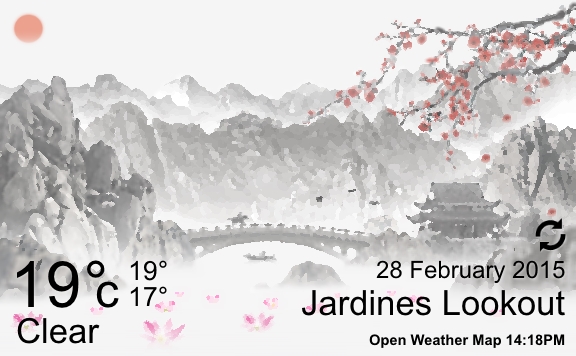

I think this is an improvement on the screenshot in the last post, much easier to see what is going on, and if nothing else gives me an obvious title for the theme: Chinese Watercolour

Monday, June 29, 2015

New Chinese Painting Theme sneak peak..

So I have been working on a new theme, and here is a sneak peak; the concept is an animated painting of a misty mountain lake in Japan or China. It is based on Chinese ink paintings, so its quite monotone, with just splashes of colour.

Still work in progress, but has some nice and different animations. I have included a waterfall for the first time, which I am very happy with; I am sure that will be reused in themes to come. Then there is a fishing boat that drifts out of the mist, the usual flying birds, some floating water lilies, and flower petals that drop from the waving tree branches. And as there is a lake, it shows water ripples as the raindrops splash down during rain scenes.

All the usual Weather conditions will be present, but maybe a bit more stylized than the other themes. I haven't decided yet whether to include sunset and night variations, or just stick with the idea of an animated painting.

And I cant quite decide whether it should be Chinese or Japanese, the gate type structure is only found in Japan, but the mountains and the temple in the background are more Chinese. So I'm also toying with the idea of replacing that with a bridge of some kind, maybe joining the left and right sides.

Anyway, here is a quick screenshot:


Tuesday, June 2, 2015

CliMate Animated Weather Widget version 3.3 released!

The new version 3.3 of cliMate is now available!

Featuring:

  • New Stonehenge Theme!
  • All forecast dates now correctly localized
  • Added moon rise and moon set in Main Screen night conditions
  • Added option to hide contrails
  • Added option to hide Date
  • Added choice of windspeed units
  • Improved layouts when widget resized to extreme widths
  • Bug fixes for rare crashes
  • Bug fix for countries that have multiple cities with the same name


So what's next? Already started on a Chinese Ink Painting style theme which looks promising, then I think its about time for a City theme.
 
Also I'm toying with the idea of an alternate forecast view on the main screen, perhaps for the next 12 hours, arranged in a clock style circle, and animated of course. You could then swipe between that detailed forecast for today, and the general forecast for the next 5 days.


Tuesday, May 8, 2012

New features coming soon.. album mode!

Sorry about the lack of updates, I have taken a 6 week break from Photo Cube for rest and to celebrate my birthday. Back to work now!

Last week I completed the Screenshot feature, which allows you to take a snap of the cube in action, without any of the distracting icons or widgets on the homescreen. You can then directly share that pic via Facebook, Whatsapp, Email, MMS, any way you like.

Now hard at work on what is probably the most requested feature, Album mode. This allows you to choose a particular photo album/directory on your sd card, then it will choose pics randomly from that album and update the cube periodically. This will be the simplest and easiest method of viewing your pics on the cube, no need do do anything other than choose an album:


Of course the Single Image and Custom Image modes will still be available for those of you who like the fine control. The Album mode will probably be the easiest to use for new users and whenever you have a new album which you want to showcase.

More technical info for anyone who cares: this is not that easy to do because of the randomness of images in the albums. I have to be careful to duplicate sides only when really necessary, e.g. when albums contain less than 6 images.

As the user is no longer cropping the pics manually I have to be intelligent about how I crop them to a square, treating Portrait and Landscape differently. The timing is also important, processing the random images is quite processor intensive, it needs to be done in the background so that any visual lag is kept to an absolute minimum as the cube is updated.

Ideally I would like a soft fade in/out of the old images to the new, but that's probably beyond the scope of the initial version, I think initially it will just update everytime the homescreen is reshown after being hidden e.g. by opening an app. Once that works I can think about making it a User Setting, e.g. change every 10 minutes, hour, 1, 2 or 3 times a day etc.

Once all that is done I would like to look at tighter integration with Facebook or other online services, would be great to be able to just choose a Facebook or Picasa album, and let Photo Cube choose pics from that online album.

Stay tuned!